There are several instances when you need a desktop-friendly email client app. One, you may have a self-hosted email account but couldn’t afford to get the Google Business Suite. Or, you may be fed up with the traditional interface offered by Gmail and Outlook. Or, probably you would want to manage your emails; get real-time notifications, and enjoy other details on your computer.
Previously, we have covered the best email clients for Android. This time, however, is for Mac. Fortunately, there is a big number of Mac email clients out there. Every day, we see the rise of something innovative. In this article, we have compiled some of the best and versatile email clients for Mac. Regardless of who you are and the work you do, you’ll find a suitable app here. Shall we begin?
Read: Best Email Apps for Android (2018)
Best Email Client for Mac
#1 Mail (Apple Mail App)
Unlike Windows, macOS ships with an inbuilt email client — named Mail. It’s probably one of the best email clients you can have for Mac too. The best part about Mail is that it keeps you active on the Apple ecosystem. That is, you can use the same app on your iPhone or iPad, syncing every bit of information you have. There are also features like Handoff for those who are in Apple ecosystem.
Handoff basically lets you start working on an email on your iPhone and complete it later on the Mac. It’s one of the exclusive features you’ll find in Mail. Keep that aside, and Mail app is the typical email client you can find. Mail does not offer much scope for customization or experimentation. There are a few add-on stuff, but they are not great.

Being an Apple product, the Mail app integrates well with macOS system. For instance, you can click on an email address and start composing the email in a split-screen window. You also get on-time notifications on the panel. Alongside all these, all your information is synced via iCloud. One thing we noted is that the Mail app may not be that seamless when you connect self-hosted email accounts.
Pros
- Free to use and built into macOS
- Continuity features like Handoff
Cons
- A non-intuitive, rudimentary design
- Lacks customization
- Navigation could be better
If you are looking for a simple email client for Mac, Mail is the best option. If you are in the Apple ecosystem, you can benefit from features like Handoff. Otherwise, you have different options too. It must also be noted that you don’t have to pay anything to use Mail.
About Mail by Apple (free)
#2 Canary Mail — Secure Email Client for Mac
Canary Mail is one of the most feature-friendly email clients for Mac. Even when offering a modern UI, it has not made any compromises in terms of security. It’s also one of the very few email clients that offer PGP Encryption. As oxymoronic as it sounds, Canary Mail is a fun & secure email client for Mac. It works with your own email accounts as well as services like Gmail.

There are a few features that we loved in Canary Mail. For instance, it offers two types of inboxes — normal and Focused. Thanks to Natural Language Search and Filters, you can quickly find emails that you are looking for. Email Templates, Snooze Features and Read-Receipt Notifications etc. are also included in the email app by default.
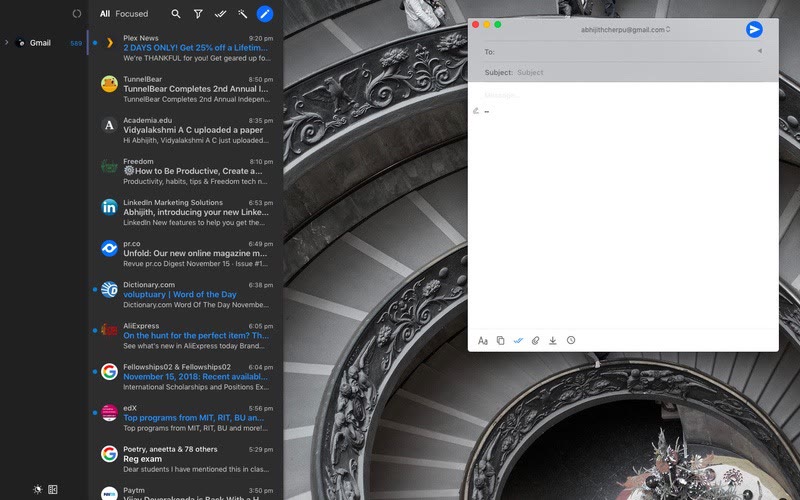
Canary Mail also offers one of the best User Interface designs we’ve seen. You can enjoy the Dark theme on both your Mac and iOS devices. if you ask us, though, we’d say the best thing about Canary Mail is the on-demand nature. You can keep all the super features aside and Canary Mail will still be an awesome way to manage your emails.
Pros
- A modern, intuitive UI
- On-demand Encryption, Read Receipt, and Focused Inbox features
- Seamless integration
- Multi-device support
Cons
- AI Cleaner isn’t up to the mark
Canary Mail is undoubtedly one of the most feature-rich email clients for Mac. It offers a state-of-the-art set of security and functionality. The AI features aren’t perfect, but you can get started. We also loved the multi-touch gesture support too.
Check Out Canary Mail ($20)
#3 Boxy — Best macOS Email Client for Gmail
Boxy is the best Mac email client for those who use Inbox by Gmail. Inbox by Gmail, in case you did not know, is a rather focused webmail interface. It also integrates with other Google services like Calendar and To-Dos. Now, Boxy is bringing all those features to a desktop app. You can simply log in using the Gmail account and get all the benefits.

The interface is no different from Inbox by Gmail. That having said, Boxy is easier to manage than the web-based UI. You also get one of the best Email Compose interfaces we’ve seen. In short, Boxy brings all good things about Gmail Inbox to your desktop. There is support for notifications as well as on-time sync as well. Boxy also supports a bunch of common keyboard shortcuts.

If you ask us, we’d recommend Boxy for the sake of the cleaner UI. Everything is available in a clean-packed way. Talking about the UI, Boxy lets you choose between different viewing modes as well as themes. You can, for instance, choose between Dark, Black, White and Crimson themes. Of course, it’s a downside that you cannot use other accounts here.
Pros
- Cleaner UI
- Optimized for Inbox by Gmail
- Easy Mail Management
Cons
- Doesn’t work with non-Gmail accounts
- Lacks customization
Boxy is loved for the simple way it presents your Gmail messages. If you are a Gmail + Google user, Boxy is a superb way to keep track of your email world. We’d recommend Boxy if you want a desktop experience for Gmail messages.
Check Out Boxy (Free)
#4 Spark — Smartest Email Client for Mac
Spark is one of the most versatile email clients we’ve seen for Mac. Developers of Spark say it is the future of email, and we may agree with that. The best thing about Spark is that you can use it for personal as well as organization-level needs. This email client has been designed in a clean manner that you can completely focus on creating the best email.

Unlike many of the email apps we’ve covered, Spark comes with a Smart Inbox. This Inbox can identify the type of email and put it to categories like Personal and Social. You can also Pin certain emails for the further look on the go. Plus, Spark lets you manage them quite easily. Or, if you want, you can shift to the Classic Inbox as well.

There are also some awesome features like mail tracking, follow-up reminders, integrated calendar, smart search, Quick replies, and worthwhile integrations. You can also optimize Smart Notifications so that you are alerted in case of important emails. By the way, Spark has a variant named Spark for Teams, which offers a bunch of features for in-team collaboration.
Pros
- Clean Design
- Smart Inbox with Categories
- Rich Email Creation Experience
Cons
- None worth noting
Spark should be your go-to choice if you need a simple email client with smart features. The developers have succeeded in including the features without making the app so bulky. In case you have a big team, you can go for Spark for Teams as well.
Check Out Spark (Free)
#5 Thunderbird — Best Free Email Client for Mac
Thunderbird is a completely free, open-source email client, available for various platforms. Being a project from Mozilla, you can count on Thunderbird when you want a secure email management experience. You’ll have to miss out some fancy features that we’ve seen in earlier products. Still, you are getting a non-clumsy way to manage email.

Talking about the UI, Thunderbird does not have anything modern to offer. For instance, it does not have a unified interface for showing emails. You can double-click on a message, which would be opened in another tab. On the right side, you can access the Integrated Calendar as well. On the bright side, however, this email client offers one of the best performance levels we’ve seen.

We really believe that Thunderbird can be better with some basic work from the team. For instance, one of the less intuitive things is to configure a new account with Thunderbird. At the same time, we really liked a few features like the Integrated Address Book and better Preferences when it comes to displaying emails. It is a simple tool, but nothing much.
Pros
- Simple, Clean Design
- Better Security and Open Source
Cons
- Rudimentary Design
- Lacks many features
Thunderbird isn’t for everyone. If you are looking for a completely free and open-source email client for Mac, it’s probably the only choice. By doing so, however, you are missing out some of the cool features. On the brighter side, you don’t have to pay a single penny.
Check Out Thunderbird (Free)
#6 Postbox — Best macOS Email Client for Multiple Accounts
Postbox is yet another email client that deserves a place here. It’s probably the best email client for Mac that comes with a lot of features. If you are someone who manages multiple email accounts and wants a cleaner UI, Postbox makes sense. This app is simple, clear and powerful, to quote the developers themselves. And, after testing it for a while, we thought the same.

Account Management is perhaps the best thing in Postbox. You can manage your multiple accounts as well as corresponding folders from the sidebar. The modern UI lets you view an email message and perform a lot of actions without much navigation. Postbox also offers a Universal Search feature, which is helpful when it comes to finding emails and attachments.

We also loved the Focus Pane in Postbox. If you’re involved in multiple projects, this feature would help you in easy navigation. Pre-canned responses and HTML editing are some nerd-focused features we found in the email app. In short, Postbox does not compromise the number of features, but you still have an intuitive way to do things.
Pros
- Simple UI and Integration
- Integrated Account Management
Cons
- Navigation Could Be Better
Postbox is a wonderful email app for Mac that everyone can use. It packs a number of features we have not seen in other packages. Still, we’d recommend Postbox for professionals, who have to manage multiple mail accounts as well as folders.
Check Out Postbox (Paid, $40)
#7 Airmail — Best Overall Email Client for Mac
We’ve saved the best for the last: Airmail. Airmail is by far the most popular email client for macOS. It is so good that people have been using it for personal, professional and combined needs. Just so you know, it is available for both macOS and iOS. You can enjoy the features as well as the same interface on both devices, thanks to the sync.

Navigation is one of the strong points of Airmail. Through a widely customizable design, you can view your emails, folders and other aspects easily. This email client has packed many features without compromising the intuitive nature of the User Interface. Even for someone who hasn’t used an email client before, Airmail is the best place to start.

Better organization of your emails is possible through Airmail, which is a great perk for most people. You can for instance snooze the email messages, star them and manage the whole conversation easily. Because this app is available for both iOS and macOS, you can have benefits of sync as well. Also, you can integrate a lot of services like Dropbox, Calendar and Google Drive with Airmail.
Pros
- Intuitive Interface
- Ample scope for Customization and Integration
- Easy Management
Cons
- Lacks smart categorization of emails
At the end of the day, Airmail is the best-balanced email client for macOS. You don’t have to worry about an extremely tough set-up or hard-to-understand features. For the price you pay, Airmail offers one of the best email and account management experiences.
Check Out Airmail ($9.99)
Which is the best Email client for Mac?
You have seen some of the best email clients you can have right now for macOS. Some of these apps, Spark and Airmail, have multi-device support as well. You can enjoy the same interface and features on your Mac as well as iPhone. Another thing we loved about Spark is that it categorizes emails based on the type, making it really easy for Quick Look.
However, if you need better continuity support, we’d recommend sticking onto the Apple Mail app. And, for anyone who is looking for the best spot between both, Airmail and Postbox would be our recommendations. In other words, depending on the level of features you need, you can choose one of these seven email clients for macOS. Awesome, huh?
Read: How to Send Encrypted Emails in Gmail and Outlook
