Plex Plugins have been deprecated. Hence, some of the Plex plugins might not work depending on the Plex version.
Last year, Plex shutdown the plugin support, but fortunately it still allows you to manually sideload them via WebTools. The only problem now is, with no app store, how do you find good Plex plugins? Well, I’ve been using some Plex plugin myself which let you stream live TV, auto-download subtitles, and even change the Plex interface. So, let’s check them out.
Before we begin
The way to sideload all Plex plugins is exactly the same. So, let’s see how you install plugins on the Plex Media Server.
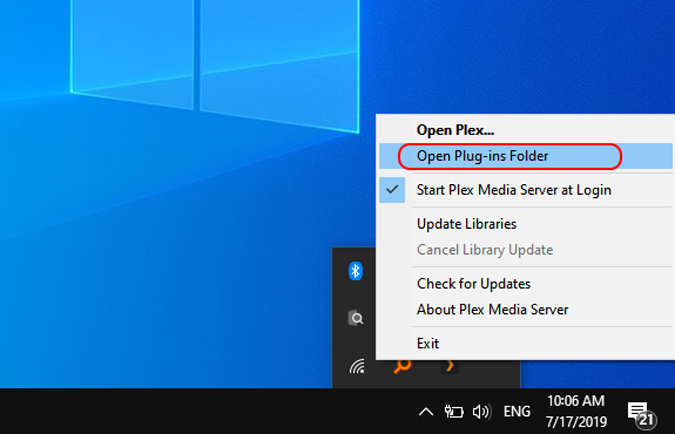
Firstly download the zip file of the plugin. You can use the links given below or head over to the Plex forum. Once you have the zip file downloaded, extract it and copy the plugin_name.bundle folder to your local Plex Plugins folder. To access the local folder, right-click on the Plex icon at the bottom tray and click on “Open Plug-ins Folder”. Alternatively, you can also copy-paste the following location in the Run box and hit enter.
%LOCALAPPDATA%\Plex Media Server\Plug-ins
Read: 4 Free VPNs That Work With Netflix (2018)
After you have copy-pasted the plugin bundle folder, restart your Plex Server. Post the restart, you should be able to see the plugin under the Plugins section.
For Ubuntu, macOS or Debian, visit this GitHub page for the plugin Installation process.
Best Plex Plugins in 2019
1. WebTools
WebTools is an unofficial Plex App Store for the Plex server. It lets you download all the previously listed apps directly to Plex. WebTools App store is a web portal and has to be accessed on a separate IP which will be displayed once you click on the plugin. The credentials for WebTools will be the same as Plex.
By Default, Plex Media Server doesn’t assign password to your account. So, setup a Password before you access WebTools.
Download WebTools
2. Trakt Scrobbler
Trakt.tv or Trakt Scrobbler is an amazingly popular plugin among Plex users and it was disappointing when Plex removed it from Plex Channels. However, you can still download it via WebTools and it works flawlessly. In case you didn’t know, it tracks your progress on TV shows and movies you have watched by syncing your playlist with your Track ID and also provides ratings for the clips.
However, if there are multiple individuals watching the same content over a Plex Server it has a hard time maintaining the sync and it could get annoying at those times.
Visit Trakt.tv GitHub
3. mangahere
If you read Mangas or a majority of your users do, mangahere is a neat plugin to add Mangas to your Plex server. mangahere routes mangas from Manga Here. The plugin is present inside WebTools and you have to just install it to push on your Plex server. The plugin provides an interface to read mangas on Plex itself instead of visiting the Manga website.
Download mangahere
4. IPTV
IPTV is a handy plugin that tries to bring live TV experience to your Plex Media Server. It reads live TV stream over the Internet and passes them onto your Plex Server. This provides more of a cable TV experience for your Plex users. The live TV stream includes movies, news channel and pretty much every category.
Download IPTV
5. FilmOn
FilmOn takes the media streaming experience to another level by integrating free TV channels. You have channels from pretty much every category like Sports, Comedy, Horror, etc. It streams channels from different countries to you irrespective of the Geolocation. You will have to pay for the paid content and it also includes a pay-per-view service.
You will need to register on the FilmOn website and enter the credentials on Plex Server.
Download FilmOn
6. Tautulli
Plex already has an inbuilt Activity dashboard and that might be enough if you deal with fewer people on your server. But, when you scale up, an advanced plugin like Tautulli aka PlexPy would help. Tautulli gives you a graphical view of watch time, current running shows and bandwidth consumption of other people. So, if you have multiple IPs accessing from a singe IP it’s easy to pinpoint the bottleneck.
Download Tautulli
7. Sub-Zero
Lately, I started watching Korean series suggested by significant other, and it’s a hard time to understand the context without subtitles. Sub-Zero is another Plex Plugin which builds subtitles for your movies. Now, Plex already provides an inbuilt subtitle generator called OpenSubtitles but most of the time it fails to work. Even Sub-Zero is not perfect and has its own flaws but it gathers in subtitles from 10 individual subtitle provider sites and APIs.
In case subtitles don’t work, you can also go online and find the SRT(SubRip Subtitle file) files and manually supply it to Sub-Zero. This GitHub Wiki will guide you through the entire process.
Download Sub-Zero
8. Ombi
Ombi is a plugin you should only use if you get frequent requests from users to download or upload content on your Plex Server. It provides a web portal to manage all the movie requests. So, instead of every user contacting you directly, they can raise a request for the content on the portal. As soon as you upload the content, the user is notified via email about the upload. Users can also report issues for a particular issue.
It is similar to PlexRequests but it has comparatively active development.
Download Ombi
9. TheaterTrailers
TheaterTrailers is an interesting Python script that downloads movie trailers for you from YouTube. The best thing is the trailers are automatically deleted as soon as the release date is passed. It’s a good way to keep the content on your Plex server engaging. TheaterTrailers would require Python, YouTube-DL, and TMDB to be installed on your Plex Web server.
Download TheaterTrailers
10. Old Movie Time
As the name suggests, Old Movie Time lets you play old classics on your Plex Server. The UI is plain simple with movie genres listed out such as Action, Crime Mystery, OMT B Classic, etc. Old Movie Time lets you stream content in FullHD with AAC audio codec. Although the collection of movies is quite small but definitely worth trying. The classics listed are definitely a treasure to explore. You can find OMT in the WebTools store.
Download Old Movie Time
11. IceFilms
If you are a Roku user, this plugin is a must-have on your Plex server. IceFilms sources various TV shows and movies from Roku TV on your Plex server. You have the option to set up an email ID so that IceFilms can notify you when your favorite show is available. There might be chances that IceFilms doesn’t function for you as desired because the GitHub version was never updated. You can fall back to LetMeWatchThis which is an alternative to IceFilms.
Download IceFilms and LetMeWatchThis
12. openPHT
Plex Server doesn’t have a dedicated app and to check on the server or upload content, I have to open the web portal every time. openPHT is a third-party add-on that provides an intuitive front-end for the Plex media server. It is available for almost every Operating System including macOS, Debian, OpenBSD, etc. The best use case I have derived is instead of logging to the web portal to listen to content, I prefer opening openPHT and stream content on the server.
Another similar Plex client is Transmorgify which is a Google Chrome extension. It provides quick shortcuts on the Plex web client and even some useful statistics. These come useful when you have your Plex server loaded with content and users.
Download openPHT
13. Plex Export
Plex Export is a handy plugin when you want to share your media list without providing them access to the entire Plex server. It produces an HTML page with all your Plex contents. Now, this HTML doesn’t require any credentials and can be shared with anyone.
You do need PHP installed on your Plex Server
Download Plex Export
Wrapping Up
Plex might have cited that the number of users using Plex channels is minuscule but the availability of plugins is vast. This GitHub page has a list of some other small Plex plugins which can open TV, music channels for you. WebTools also has a vast app repository that lets you install plugins at a single click.
For any queries or issues, let me know in the comments below and I will get back to you.
Also Read: 5 Best Android Apps to Download Subtitles
