HBO has been pushing its portfolio and with the recent launch of HBO Max for $15/month, it has surpassed its content which was previously available with HBO Now and HBO Go. Along with all the unique content, it now also features originals like Westworld, Watchmen, Veep, and Curb Your Enthusiasm, and of course, recently launched Wonder Woman 1984. The library also includes all Harry Potter movies, the Lord of the Rings Trilogy, and exclusive rights to all the season of the show ‘Friends’.
However, there’s one catch. It’s only available in the US. And while you can use a VPN to bypass geo-restriction, you still need an American credit card to sign up. But I’ve got a workaround to use it even without American credit cards or even gift cards.
Before we begin
To get HBO Max outside the US, you need an Android smartphone. If you don’t have an Android phone you can also use an Android emulator like Nox player on your computer. Once you have created a new HBO max account with your Android phone, you can use the login credentials on iOS and Web. We will show you the steps for that in the end of the article. With that out of the way, let’s begin.
How to get HBO Max Outside US
Step 1: Take your phone out, now try searching for HBO Max on the Play Store or the App Store. If you don’t see it in the results you might want to change the country which is possible in both the stores. Although, do keep in mind, changing your country might stop your existing subscription. We recommend creating a new account registered in US and switch accounts on the App Store to download the app.
Alternatively, on Android, you also have the option to sideload the HBO Max APK. Simply download the app, Hit ok if you see a prompt and install the app.

Step 2: Now install and open the app. You’ll notice that when you try to open the app, you get an error message that says, ‘ Service not available in your country’.

Step 3: Don’t worry, a simple way to bypass this error is to open the app via a USA server. To do that, open your VPN app if you are already using one.
Unfortunately, when it comes to removing geo-restriction on streaming sites, Free VPN apps like ProtonVPN won’t work with HBO Max. Hence, we would need a paid VPN app. There is a lot to choose from but I would recommend SurfShark VPN. It works in most cases and it’s the cheapest of the lot ($2.21 per month.)

Note: You might have to match your phone’s time to the U.S. To do that, go to your phone settings and set the timezone to New York. Also, turn off “Automatic Time adjustment”.
Adjusting the time is only necessary for the first time when you set up the account. However, in my case, there was no need to adjust the time.
Step 4: Now launch the HBO Max app, and you’ll be welcomed with an array of shows. Well, you can’t watch them as of now. Click on the “Account” icon at the bottom right which will take you to the “Start a Free Trial” page. All you have to do is follow the instructions and set up an HBO Mox account.

Step 5: After you’re done setting up your account, it will prompt you to ‘Start with a free trial’. For this step, use your Google Pay account as the app doesn’t differentiate the payee detail is outside the USA. A certain amount will be deducted for authentication which is later refunded. Now add your credit card information.
Let it process, tap on Let’s Go and you’re all set. Just manage your account and add profiles if you want and you can start streaming right away.
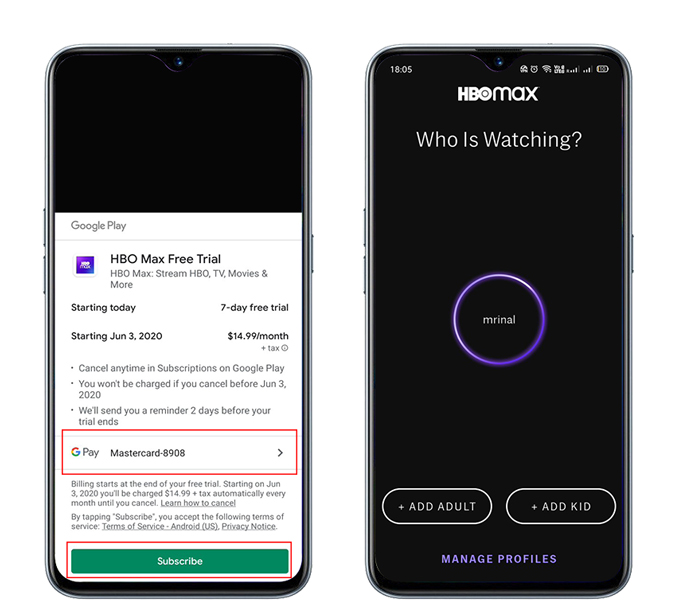
There might be a possibility that the app creates some issues or shows you a login error. Don’t worry, just clear the cache, cookies, and the app history, and run the app again after connecting it to the US server with a VPN app.
How to login on iOS
Similar to iOS, if you search for HBO max on your App Store, you won’t find any results. To fix that, follow the steps.
Step 1: Go to your iPhone’s account settings and change the country to the US. Remember, if you do that, your existing subscription will be canceled so, create a new account if you don’t want that. While changing your App Store country, make sure you set the payment to None, or else you will need an American credit card.

Step 2: Now, go back to the App Store and search for HBO Max, this time you will find it. Next is easy.
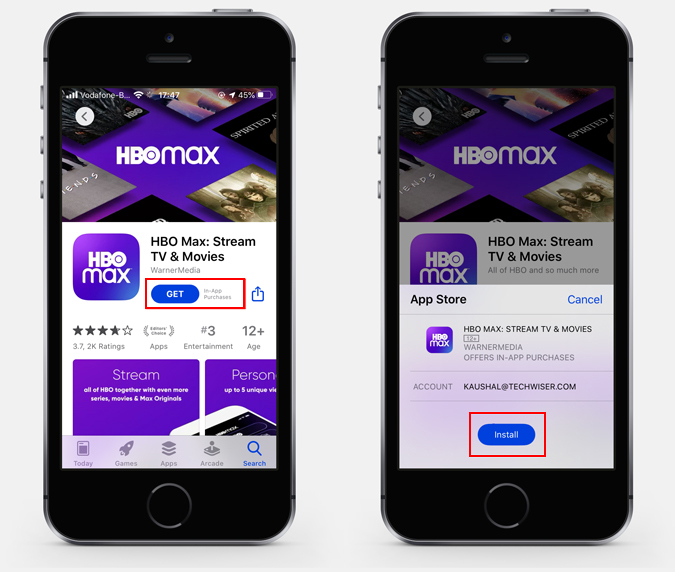
Step 3. Simply, run a VPN with a US server, login with your HBO max credentials that you got from Android smartphone, and watch your favorite shows.
Which platforms can you watch on?
Once you have the login credentials from Android, you can use those to watch HBO Max on pretty much any device with a web browser, be it your Mac or Windows computer.
If you wish to watch it with your Play Station 4 or Xbox, we have that sorted as well. You can set up a Smart DNS Proxy server on your router and enjoy HBO Max after you’re done defeating your best friend in a game of football.
However, due to distribution rights, HBO max is still not available on two major streaming device – Firestick and Roku. We’ll update you once the deal is made.
Closing Remarks
I know how sad it was to hear that Friends is leaving Netflix and if you are located outside the U.S.A, it’s even sadder because of the HBO Max geo-restriction. But I hope I was able to give you a workable solution, so you don’t have to wait to watch your favorite shows and movies. Also, if you’re eyeing on that Friends Reunion Special, you might want to subscribe before it comes out. Besides, HBO Max is the only platform for all 12 seasons of The Big Bang Theory, along with South Park and Rick and Morty.
Also Read: How to Watch Wonder Woman 1984 Outside USA on Android, iOS, Android TV, Firestick, and Web
