I retired my Thinkpad a while ago for a newer and a faster laptop. Even though I would not want to go back to my previous computer but I do miss one feature on my ThinkPad – the fingerprint sensor. It was a small feature that I was so dependent on it, I had almost forgotten my Windows Password.
There are multiple apps (like MacID) to unlock Macbook with an iPhone using Touch ID, proximity, or another gesture. And they all work flawlessly. Yes, the same is true for Windows and Android, but the process never been as reliable as Apple ecosystem.
For a long time, I was looking for a reliable way to unlock my Windows PC without the need for a password, I even thought of ordering a USB biometric module but scrapped it because I don’t like those dongles and wires. I wanted something quick, and wireless.
Thanks to XDA’s user Andrew-X, if you have an Android device with a fingerprint scanner (which most smartphones do these days), you can use it to unlock Windows 10. I had to check it out and surprisingly, it works really well. Let’s install it on our computers.

Also Read: How To Watch HBO Now outside of the US
How does it work?
It’s a simple script which runs on your computer and when you authenticate your finger on the smartphone’s fingerprint sensor, it sends a data packet containing your Windows credentials to the script running on Windows. All you need is both your Windows PC and Android connected to same WiFi network. I did a thorough testing of the app and it works great. It isn’t the fastest way to unlock your Computer but it is fairly efficient.
Unlock Windows With Android Fingerprint
First things first, you’d need a computer running Windows Vista or above and an Android device with a fingerprint sensor running Android 6 or above.
Set up Windows
Install the Windows credential module on your computer by choosing the appropriate version. Windows Credential Module has both 32-bit and 64-bit versions, so select accordingly.
While installing the module, it would ask you to grant an exception in the firewall, which would allow the module to receive the data packet while locked out of the system. After granting the permission, the setup would finish and it would run silently in the background.
To check if it is installed correctly lock your computer by pressing Win + L. You’ll notice a new account on the bottom left named ‘Fingerprint Unlock’. If you see that, the script is up and running and you’re halfway through the process.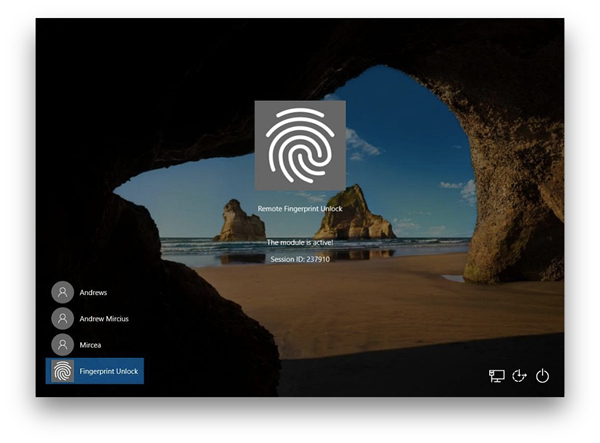
Set up Android
Now, we need to install an app on the Android device, you can tap this link to download it on your smartphone. First, you need to scan for computers running the credential module. You should keep the devices on the same network for easy discovery. Select the device to add account credentials. You can add multiple credentials for multiple users for a computer. You can even add multiple computers to the app to unlock them from your smartphone.
  While adding the credentials it would ask you to authenticate it with a fingerprint. The credentials have to be correct or else it won’t work and you’d have a hard time figuring out why it isn’t working.

Once everything is done, you can unlock your computer by running the app on your phone and tap the fingerprint long enough so that it registers your fingerprint. It should unlock your Windows fairly quickly.
Unlock Windows With Android Fingerprint
This method is a quick way to unlock your computer from your smartphone but in my opinion its not the safest option out there. You should use this method for daily use if don’t you store a lot of confidential information on your computer. There was one other thing that I noticed while testing it. It is really hard to delete your credentials from your app. It might just be a bug. Tell us if you like this method of unlocking your Windows computer in the comments below.
Read: How to Change App Store Country on iOS12/11
