Published: August 27, 2026

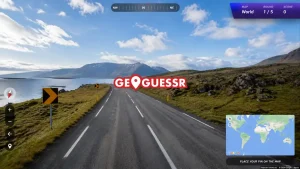
Playing GeoGuessr with friends is a lot more fun when you can compete against people you actually know. In this guide, we'll show you how to play GeoGuessr with friends, how to create a party, invite everyone, and what game modes you can try together. We’ll also cover a way to play against your friends at your own time if you don’t want everyone online at once.
How to Create a GeoGuessr Party
Firstly, you should know how to play GeoGuessr before jumping into multiplayer. Next, make sure one person in your group has a GeoGuessr Pro subscription, and pricing starts at $6.99 per month. That person will act as the host, while the invited players can join the Party without their own subscription or even a GeoGuessr account. Up to 100 guests can join a Party.
Here’s how to set it up:
- Open GeoGuessr: The host should log in to their GeoGuessr account.
- Go to Party: Open the Party option and choose to create a new Party.
- Choose your game: Select the game mode and map you want to play.
- Share the invite: GeoGuessr will give you a link or code that you can send to your friends.
- Let your friends join: Your friends can use the shared link or code and simply choose a nickname to enter the Party.
Once everyone is inside, the host can start the game, and you’re ready to see who has the best GeoGuessr skills.
If you want to improve before challenging your friends, check out our GeoGuessr tips and tricks to learn useful clues and strategies.
All GeoGuessr Multiplayer Modes
Once everyone has joined your Party, it’s time to choose how you want to play. GeoGuessr lets the host pick the game mode and map before starting the Party.
Here are some of the options you can try:
Geo Duels
Compete against each other and see who can make the better guesses.
Team Games
Split into teams and work together to beat the other side.
Live Challenges
Everyone plays the same locations and compares their scores.
Bullseye
Work together to get as close as possible to the correct location.
Custom Maps
Pick from different maps and locations to make the game easier, harder, or simply more interesting.
The best part is that you can change the map and game mode depending on your group. If everyone is new to GeoGuessr, start with a simple Moving game. Once you get comfortable, try Duels or some of the more competitive formats. You can also check out our GeoGuessr Daily Challenge Answers if you maintain your daily streak.
How to Play GeoGuessr With Friends at Different Times
Don’t want everyone to be online at the same time? You can use a Challenge Link instead. Create a challenge on a map, choose your settings, and share the link with your friends.
Everyone can then play the same rounds whenever they have time and compare their scores on the shared leaderboard. This is a great option when your friends have different schedules.
What If Nobody Has GeoGuessr Pro?
If no one in your group has a GeoGuessr Pro subscription, you can still enjoy same location-guessing game experience for free. There are 7 alternatives if you are wondering how to play GeoGuessr for free.
But there's no way to create your own private Party for free in the official party. However, you can look for public Party codes shared by the community and invite your friends to join the same room. Check GeoGuessr Discord communities, Twitch streams, and other GeoGuessr groups where players often share room codes or links for others to join.
FAQs
Yes, but one player needs a GeoGuessr Pro subscription to create and host a private Party.
No. Friends can join a hosted Party without having their own Pro subscription.
A GeoGuessr Party can have up to 100 guests, making it suitable for large groups.
Yes. You can create a Challenge Link and share it so everyone can play the same rounds whenever they want.
Duels are great for competition, while Bullseye and other cooperative modes are better if you want to work together.
Yes. Everyone can join the same Party from their own device using the shared link or room code.
And that’s all, peeps! Now you know how to play GeoGuessr with friends and can start your own games together. Grab your friends, pick a mode, and see who can get the closest. Stay tuned for more gaming guides and daily puzzle answers!