Nintendo recently launched the portable version of its highly popular console – Nintendo switch lite. The major difference between the two is that the original Switch can be played on your TV or in handheld mode, while the Lite can only be in handheld mode.
If you are planning to buy a new Nintendo switch or lite, but are not sure if you would like their game catalog, you can use Yuzu Switch Emulator, to play Nintendo games on your PC. The emulator is still a work in progress. The Vulkan back-end hasn’t been added. Moreover, performance is spotting on anything apart from the best processors. However, it works and popular games like Super Mario Odyssey can be run on your PC.
How to Play Nintendo Switch Games on PC
Today, we’ll be having a look at how to set up Yuzu. After that, we’ll get into some performance figures for Super Mario Odyssey. There is one important thing to keep in mind. We don’t condone piracy here. It’s important that you only use games you own for Switch with Yuzu. In order for them to work, you need to extract decryption keys. The Yuzu Github page has a handy step-by-step guide on how to do this. Before reading this guide, you might want to have a look at that first. You’ll need the title.keys and prod.keys for whichever game it is that you’re going to play.
Before we get into the guide, let me give you a quick look at my hardware platform. While Yuzu is playable on many systems, you should note that it is still a very intensive program. If you’re running anything less than a dedicated modern gaming rig, now’s a good time to turn back. You just won’t get playable framerates.
Our Test Platform
- CPU: Ryzen 1600, overclocked to 3.6 GHz
- GPU: RTX 2070 Super, overclocked to 1980 GHz
- RAM: 16GB of Dual-channel DDR4 RAM at 2733 MHz
- Storage: 128GB Foresee M.2 SSD + 240GB Kingston A400 SATA SSD
- Motherboard: Gigabyte B450 DS3H
- Power Supply: Cooler Master MWE 550 Bronze
For reference, if you’re expecting similar performance, a Haswell i5 or i7, such as the i7-4770K is the minimum. In the GPU department, you’ll want something like a 1050 Ti at a minimum. If you’re planning on running at higher resolutions, a GTX 1070/Vega 56 is a starting point. Again, keep in mind that this will not run well on typical laptop hardware. Well, with that out of the way, let’s get into the setup process.
Download Yuzu
There are two ways that you can install Yuzu. You can either download the Web installer from the Yuzu website or directly download the latest build off of Github. We’ll show you how to do both. In my experience, though, the direct Github download was faster.
To set up the Yuzu Web Installer:
1. Visit the Yuzu Downloads page here.
2. Click on Download
3. Once downloaded, run the installer as Administrator
4. Click on Install
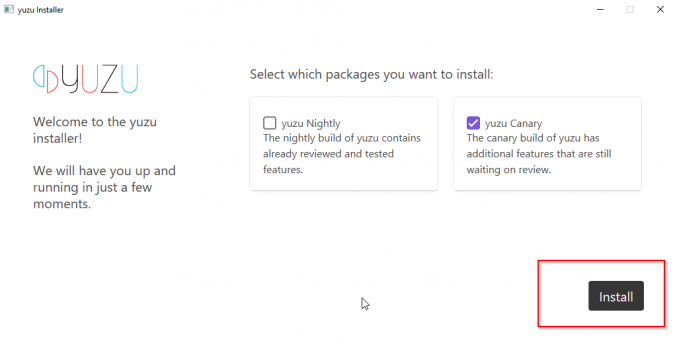
5. You’ll want to copy your prod.key and title.key files to the Yuzu AppData folder. You can find it here: C:\Users\(Username)\AppData\Roaming\yuzu\keys

To set up the Yuzu Github build directly
1. Visit the Yuzu Github canary release channel here.
2. Click on the link highlighted in the following screenshot, to download Yuzu
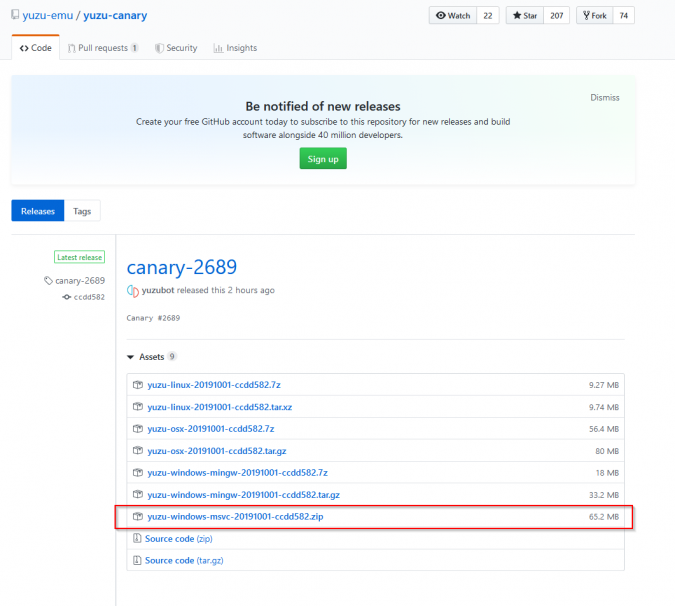
3. Use a Zip extractor to extract the files wherever you want them
4. Run Yuzu once. You can do this by right-clicking yuzu.exe and running as administrator. This’ll set up the key folder.
5. Copy your prod.key and title.key files to the key folder in Yuzu AppData. We mentioned how to do this earlier.
The Web installer is simpler to set up. However, in our experience, the download speed was inconsistent. Even on a 50 Mbps connection, it took well over 10 minutes just to get to 20 percent. I downloaded the Github version in a couple of seconds.
How to play games on Yuzu:
To be on the safe side, we suggest that you have a look at this game dumping guide to dump legitimate copies of games you own on a Switch, before using them in Yuzu. However, if you own the license to a game and you live in a jurisdiction where it’s allowed, you can get hold of Switch game images. These have either the .xci or .nsp file extensions. This can save you time in dumping the file. We’re using a Super Mario Odyssey .nsp here. To play a game on Yuzu:
1. Run Yuzu as administrator
If you installed Yuzu using the Web installer, the executable will be in your Local AppData folder, here: C:\Users\(Username)\AppData\Local\yuzu\canary
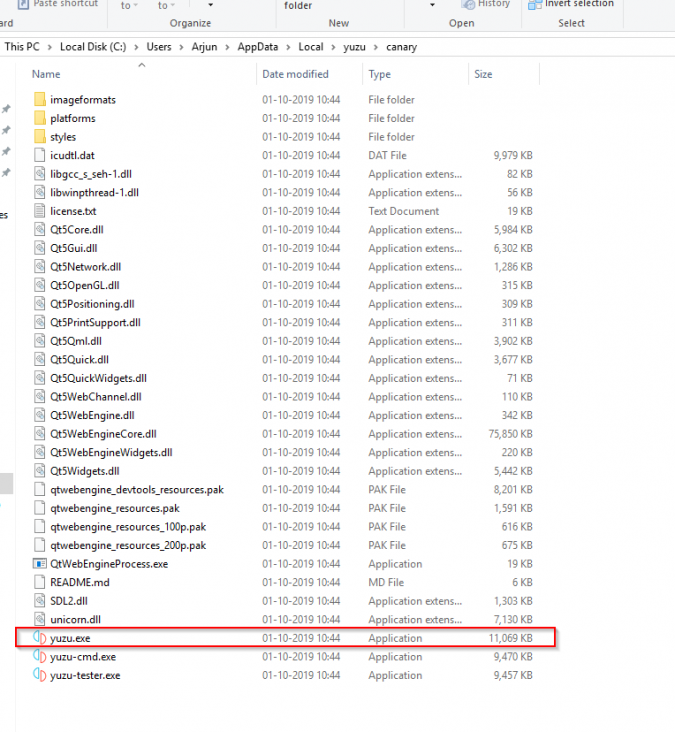
2. Load the game image
Click on File, then click on Load File, then select your Switch game image
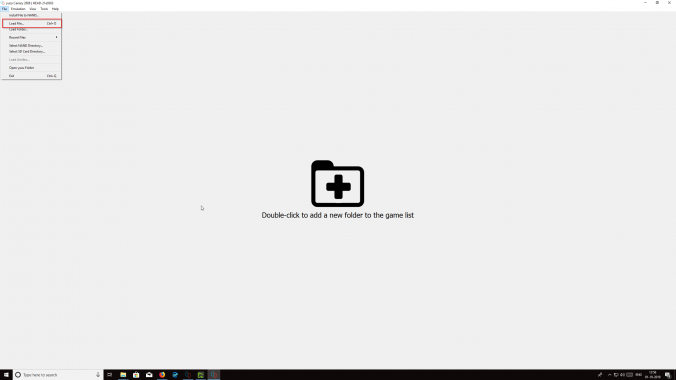
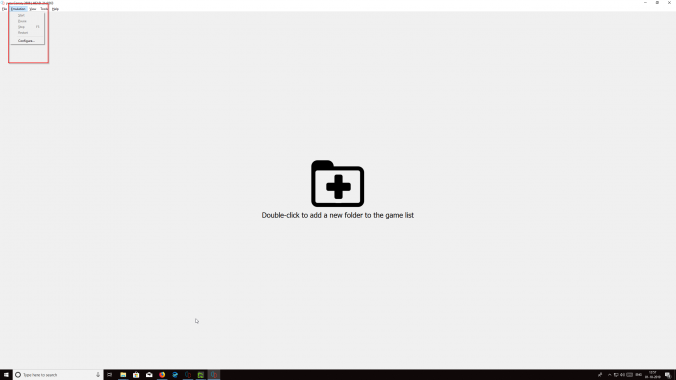
3. You can start playing. Optionally, you can go to Emulation, then Configure to set controls up according to your preference.
How does Yuzu Perform?
I’ve attached gameplay snipped of Yuzu below. It was recorded using FRAPs. In-game performance recording enabled is a bit higher, but the general scenario is easy to observe. Yuzu struggles, a lot. You can tweak the emulator a bit by enabling the Asynchronous GPU setting under Graphics in the configuration panel. Even then, though, yuzu struggles to maintain 30 FPS in-game at times. Because shaders are being loaded in constantly, there is significant hitching and stutter. This goes away with time.
But even then, it’s a profoundly compromised experience. The stutter is the main limiting factor. Once loading is done for an area, Super Mario Odyssey often runs between 50-60 FPS there. However, run any further and you get more framerate drops. Another issue is that, since the game uses dynamic resolution scaling, the low framerate causes it to drop the resolution. This results in a blurry image. All in all, it’s not an ideal way of playing the game.
Should you use it now?
This isn’t meant to be criticism, though. It needs to be remembered that the Switch is an eighth-gen console. It runs many of the same games the PS4 and Xbox One do, like Doom. The very fact that just a year into development, Yuzu’s already delivering 60 FPS in places is a big deal. For now, we’d advise against using Yuzu unless you’ve got a top-tier overclocked processor. For the rest of us, another year’s worth of cumulative updates should get the emulator into a playable condition. We’ll keep our eyes peeled and let you know.
