You may find app updates annoying, but they are still necessary to fix bugs, vulnerabilities and add new features. The real problem begins when you update an app and that breaks it. If you ever read the reviews on Google Play Store, it’s not hard to find comments like – ‘the app has stopped working after the latest update’ or ‘this version is broker’.
Unfortunately, Google Play Store doesn’t provide any option to roll back to the previous version of the app. But, thanks to repositories like APKMirror, you can not only go back in time and install the old version of Android app, but I’ll also show you a quick way to verify whether the older version you are downloading is tampered with or not.
Read: How to Extract APK File of Any App on Your Android Phone
Install Old Version of any Android App and Verify It
While there are many sites that host older versions of Android apps, APKMirror is our top pick. It’s popular and secure (owned by reputed Android Police Network).
You can find the old version of pretty much any app here. Recently, Snapchat pushed an upgrade which made a lot of people angry. If you are one of them, here is a way to roll back to the previous version.
Follow the Steps
Go to APKMirror and search for the app you are looking to downgrade. Let’s say it is Snapchat because the new version is ruining the experience. Search for the app and you will see different versions available for download. Select the version dated before the latest release of the app and download it on your mobile.
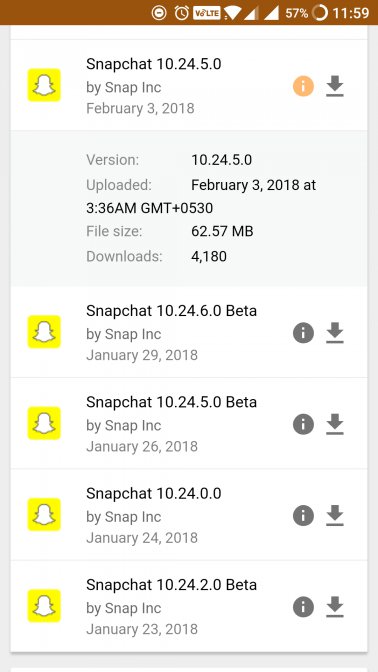
I’m not a very big fan of APKMirror website layout, it’s hard to find the right version of the app and there are deceptive download buttons (read ads) near the actual one, so be careful while downloading the apps. So, before you install the old version, you must verify it
First, you need to uninstall the latest version of the app that you just upgraded and hate so much.

Install the old version you just downloaded. Since you are installing the app from outside the Play Store, make sure to turn “Enable app installation from Unknown Source” by going to your Settings – Security, if you haven’t done this already.

Do not open it after installing it. I repeat, do not open the old version of the app you just downloaded and installed. Hit the Home button after installation is done. We first need to verify whether it is from the same developer, and has not been tampered with. Though APKMirror is a well-respected site, you can never be too sure. If you have installed the app and not launched it, the app can do no harm no matter how malicious it is.
Go to Play Store and search for ‘Snapchat’. If you have downloaded the legit version of the app, you should be able to see ‘Update‘ option. Go ahead and see if you can update the app.
If the app begins to upgrade, it is safe and digitally signed by the same developer.

Stop the update and launch the old version of the installed app to enjoy it. However, if the update fails, uninstall the app immediately and find another source.

So, what’s going on?
Google doesn’t allow developers to maintain more than one version of the same app in the Play Store. So, every developer can only upload the latest version. Each developer, before he/she uploads the app, signs it digitally with a unique number.
Every developer has a unique number for his app. If the version you just downloaded has a different sign than the one on the Play Store, the app will fail to upgrade. It will show an error because the sign doesn’t match. This shows that the APK file was tampered with by another developer and might contain bad code.
Now that you know how to install an older version of the app, and how to verify if it is genuine or not, let’s take a look at some important points that will help you stay updated without breaking anything.
Why Auto Updating Apps is Not Always Good
While the developer has the best intention in his heart, new updates can be bad because, well, no one was at fault. Maybe the app was updated to work on the latest version of Android, and you are still rocking an older version making the app incompatible with your device. Speaking of the device, Android ecosystem has thousands of devices from all sorts of manufacturers, and they all come with their own screen sizes and customized ROMs.
This makes it hard for a developer to keep track and sometimes, the app is simply not compatible with your particular make and model. Send an email or leave a review and the developer will quickly bounce back with a fix. Other reasons for not liking a particular update can be ads, unnecessary features, and hardware compatibility.
How to Avoid This Situation in the First Place
Prevention is better than cure. You can avoid getting stuck in this situation easily. What you need to do is disable auto-update feature in the Play Store. This way, you can choose which apps you want to update manually. Every time a new update is rolled out, the developer will share details on what the update fixes.
Before you hit the update button, go ahead and read the most recent comments in the app review section. You will get an idea of whether the app is working correctly after the latest update. If you find that the comments are satisfactory, you can update the app. If you read someone complaining about how the recent update “broke the app“, wait it out for the next update which should be released quickly. These are minor updates released to quickly fix the issue. Sure, there is some work involved here but it is still better than updating without breaking havoc.
Wrapping Up: Verify and Install Old Version of Android App
The digital signature is a security feature which is really cool, however, not many people know about it. Well, now you know and it is your duty to share it with your friends so that they don’t end up compromising their smartphone.
You need to be careful with the process. Although it is simple to follow, the most important point is to not run or open the old version of the app after installing it. There is no app, as far as I know, that can check the digital signature directly. So you will have to follow the steps. I will update the post if I find one. Happy hunting!
