
 Published: September 18, 2026

The WD-L014 error in WARDOGS is a startup crash that stops the game from launching entirely. It is one of the most commonly reported issues since the game launched and is almost always tied to the Elytra anti-cheat system, corrupted game files, or a conflict with Windows security settings. Here is how to fix WARDOGS' WD-L014 Error code.
What Causes the WD-L014 Error in WARDOGS
The WD-L014 code appears upon launching WARDOGS with a message saying the game can't start. The most common causes include a corrupted or improperly installed Elytra anti-cheat, a conflict with other programs running in the background like Riot Vanguard or a VPN, or Windows Memory Integrity blocking the anti-cheat from loading.

How to Fix the WARDOGS WD-L014 Error
- Restart your PC first. Before trying anything else, simply restart your computer and launch the game again.
- Repair the Elytra anti-cheat. This is the most common fix for WD-L014.
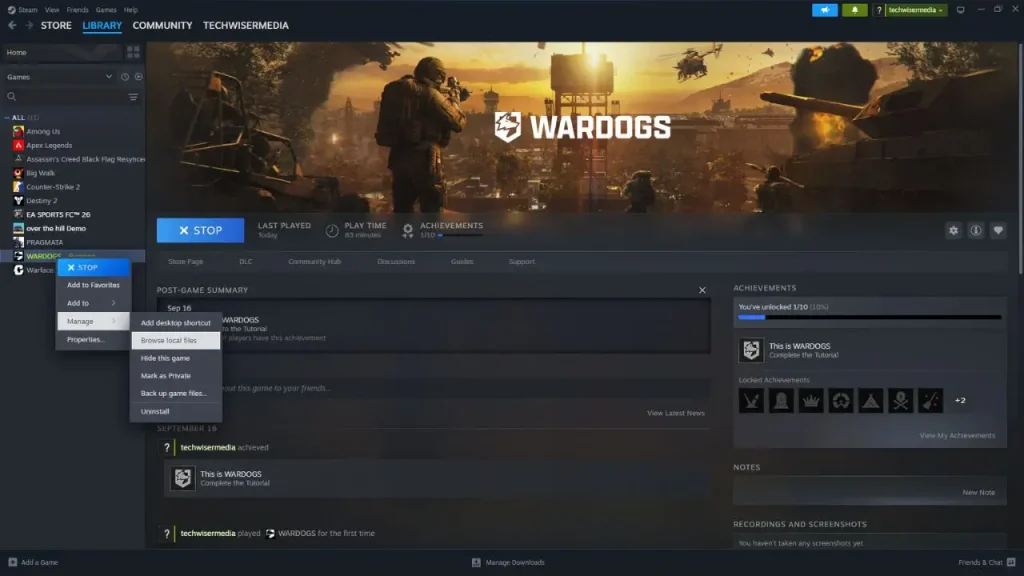
- Open Steam and go to your Library.
- Right-click WARDOGS, select Manage, then Browse Local Files.
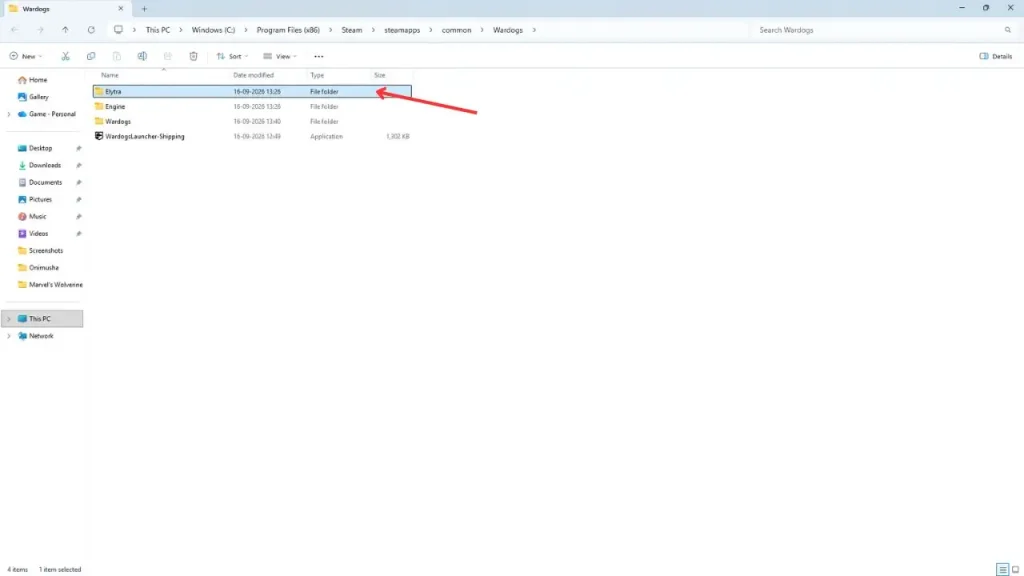
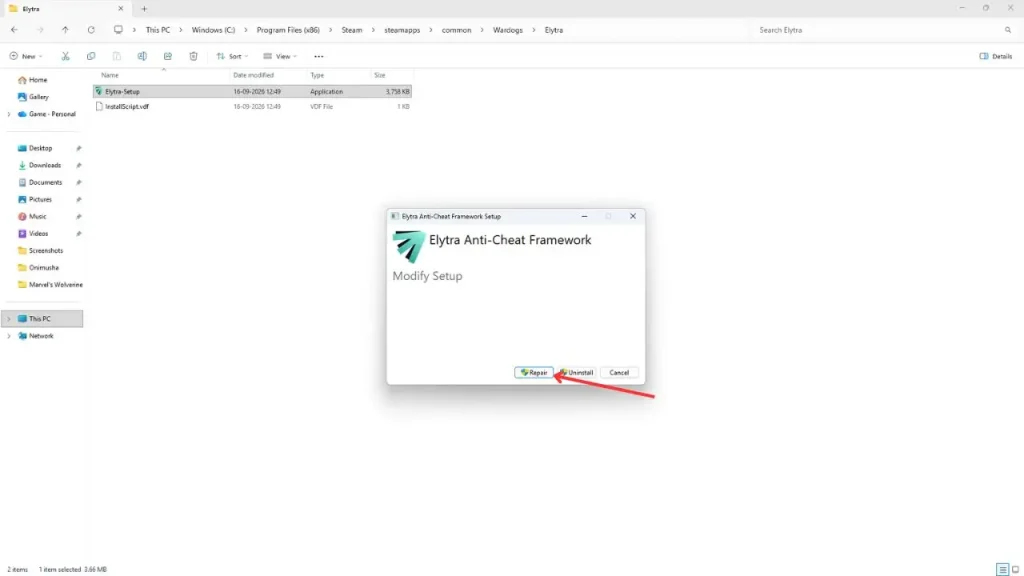
- Inside the installation folder, find the Elytra folder and open it. Run Elytra-Setup.exe and select the Repair option.
- Once the repair finishes, restart Steam and try launching the game again.
- Run Steam as administrator. Close Steam completely by right-clicking its icon in the system tray and selecting Exit Steam. Then find Steam on your desktop, right-click it, and select Run as Administrator. Try launching WARDOGS again from your library.
- Close conflicting background programs. Several programs are known to conflict with Elytra and trigger WD-L014. Before launching WARDOGS, close all that are running in the background: Riot Vanguard, Discord, and any active VPN applications. Check your system tray for each and right-click to exit them fully before trying to launch again.
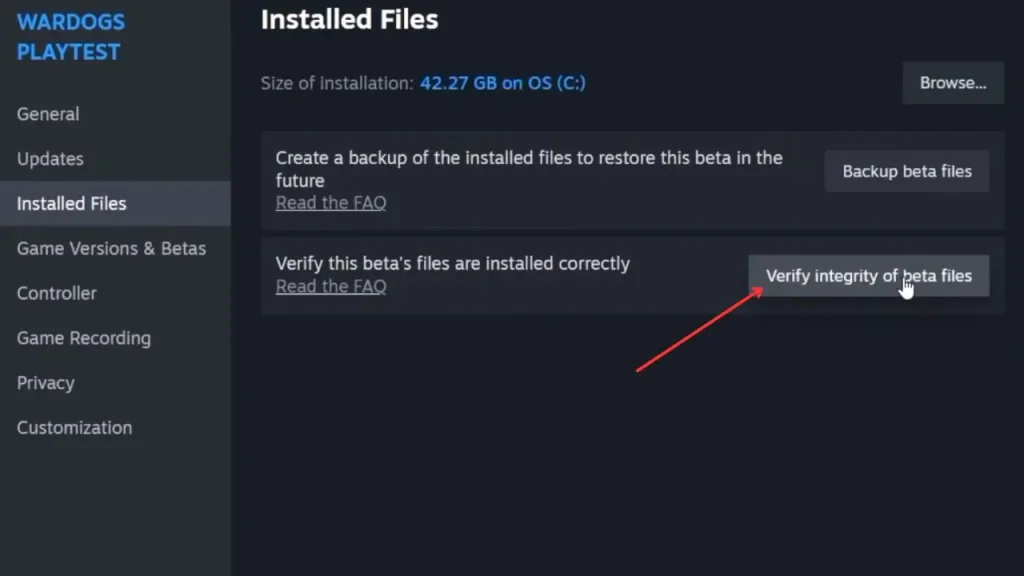
- Verify your game files. Corrupted local files can prevent the game from starting correctly. Open Steam, right-click WARDOGS, go to Properties, select the Installed Files tab, and click Verify Integrity of Game Files. Let Steam complete the check and replace anything damaged before launching again.
- Toggle Windows Memory Integrity. Windows Memory Integrity under Core Isolation can block Elytra from loading correctly.
- Open Windows Security, go to Device Security, then Core Isolation Details, and temporarily turn off Memory Integrity.
- Restart your PC and try launching WARDOGS.
- You can turn Memory Integrity back on after the game is working.


Also Read:
Check out our WARDOGS wiki for more guides on weapons, factions, vehicles, troubleshooting common errors, and more.
FAQs
WD-L014 is a startup error that prevents WARDOGS from launching.
Go to Steam, right-click WARDOGS, select Manage, and then Browse Local Files. Open the Elytra folder inside the installation directory, run Elytra-Setup.exe, and select Repair.
Temporarily disabling Memory Integrity under Windows Security can resolve WD-L014 if it is blocking the Elytra anti-cheat.


