
 Published: September 24, 2026

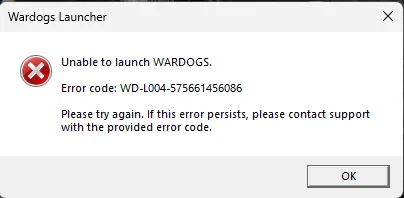
The WD-L004 error in WARDOGS displays as Unable to launch WARDOGS followed by the full error string WD-L004-xxxxxxxxx. It prevents the game from opening entirely and is one of the more frustrating launch errors because it occurs before you even reach the main menu. Here is what is causing it and how to fix the WARDOGS error code WD-L004.
What Is WARDOGS Error Code WD-L004
WD-L004 is a launcher-level error that occurs during initial startup of WARDOGS before the game fully loads. Unlike errors tied to corrupted files or anti-cheat conflicts, it is almost always caused by a network or DNS issue blocking the launcher from making its initial connection to the WARDOGS servers.
The most common culprits are restrictive network environments such as university or workplace Wi-Fi where firewall rules actively block game launchers and online services. It can also appear on home networks where certain ISP-level DNS configurations interfere with the launcher's connection attempt.
How to Fix WARDOGS Error Code WD-L004
Fix 1: Switch to a Mobile Hotspot
This is the most reliably reported fix from the community. If you are on a restrictive network such as university or workplace Wi-Fi, the firewall rules on that network may be blocking the WARDOGS launcher from completing its startup connection.
Disconnect from your current network and connect your PC to a mobile phone hotspot instead. Relaunch WARDOGS on the hotspot connection. If the game launches successfully, it confirms that your original network's DNS or firewall settings are the cause. Once you are in the game, you can switch back to your preferred network connection without being kicked.
Also Read:
Fix 2: Switch to a Different Network
If a mobile hotspot is unavailable, try connecting to a completely different Wi-Fi network, such as a home router if you are on campus, or a different access point entirely. The goal is to bypass whatever DNS or firewall rule is blocking the launcher's initial handshake.
Fix 3: Use a VPN
If switching networks entirely is not an option, a trusted gaming VPN can achieve the same result by routing your launcher connection through a different path that is not subject to your network's firewall rules. Connect your VPN before launching WARDOGS restart the game normally.
Fix 4: Verify Game Files
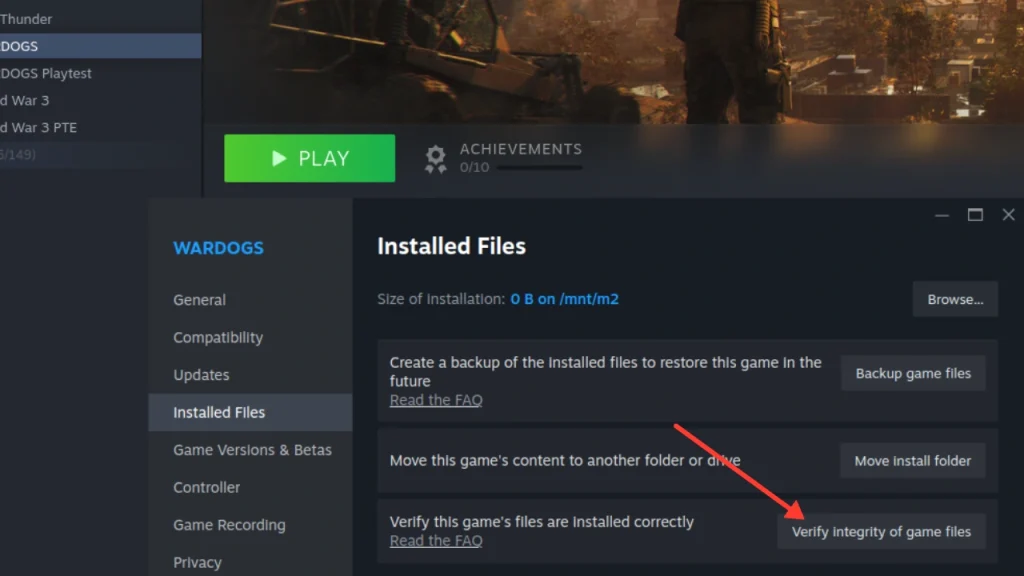
If none of the network-based fixes resolve the issue, there is a small chance a corrupted local file is contributing to the problem. Open Steam > Library > right-click WARDOGS > Properties > Installed Files > Verify Integrity of Game Files. Let Steam complete the check, then launch again.
WD-L004 is almost always a network environment issue rather than anything wrong with your installation. If you are on a university campus, workplace network, or any other managed Wi-Fi, the mobile hotspot workaround is your fastest path to getting into the game. Once the launcher connects the first time successfully, switching back to your preferred network mid-session tends to work without issue. Check out our WARDOGS wiki; also, here are a few common error codes in WARDOGS:
FAQs
WD-L004 is caused by a network or DNS issue that prevents the WARDOGS launcher from completing its initial connection during startup.
The most effective community-reported fix is switching to a mobile phone hotspot before launching the game.
The launcher may be blocked by university network firewall rules, which triggers WD-L004.


